AWS Certified AI Practitioner (AIF-C01)
AWS Certified AI Practitioner (AIF-C01) certification study notes, this guide will help you with quick revision before the exam. it can use as study notes for your preparation.
DashboardAmazon SageMaker
- Amazon SageMaker
- Overview
- Automatic Model Tuning (AMT)
- Model Deployment and Inference
- SageMaker Studio
- Data Wrangler
- SageMaker Feature Store
- SageMaker Clarify
- SageMaker Ground Truth
- ML Governance
- SageMaker Model Dashboards
- SageMaker Model Monitor
- SageMaker Model Registry
- SageMaker Pipelines
- SageMaker JumpStart
- SageMaker Canvas
- MLFlow for Amazon SageMaker
- Summary
Overview
- Amazon SageMaker is a fully managed service that enables developers and data scientists to build, train, and deploy machine learning models.
- It addresses the common challenges of managing the entire ML process in one place and provisioning infrastructure.
- SageMaker provides an end-to-end ML service that includes
- Data Collection and Preparation: Gather and prepare datasets for training
- Model Building, Training, and Tuning: Develop and optimize ML models
- Model Deployment: Deploy models to production
- Performance Monitoring: Track and monitor prediction performance
Built-in ML Algorithms
- SageMaker offers a comprehensive set of built-in ML algorithms
- Supervised Algorithms:
- Linear regression and classification
- K-Nearest Neighbors (KNN) for classification
- Unsupervised Algorithms:
- Principal Component Analysis (PCA) - reduces the number of features in a dataset
- K-means clustering - finds groupings in data
- Anomaly detection
- Specialized Algorithms:
- Textual algorithms for NLP and summarization
- Image processing algorithms for classification and detection
Automatic Model Tuning (AMT)
- Automatic Model Tuning optimizes hyperparameters to improve model performance
- You define the objective metric
- AMT automatically selects:
- Hyperparameter ranges
- Search strategy
- Maximum runtime for tuning jobs
- Early stopping conditions
- Benefits: Saves time and money by avoiding suboptimal configurations
Model Deployment and Inference
- SageMaker enables one-click model deployment with automatic scaling and no server management, reducing operational overhead.
- Real-Time Inference:
- Provides an endpoint for individual predictions
- Uses EC2 instances under the hood
- Best for: Low-latency, interactive applications
- Serverless Inference:
- No charges during idle periods between traffic spikes
- Trade-off: Must tolerate initial startup latency (cold starts)
- Best for: Sporadic, unpredictable workloads
- Asynchronous Inference:
- Supports large payloads up to 1 GB (stored in S3)
- Supports long processing times (up to 1 hour)
- Good for near-real-time latency requirements
- Requests and responses stored in S3
- Best for: Large payloads requiring extended processing
- Batch Transform:
- Recommended for predictions on entire datasets
- Requests and responses stored in S3 buckets
- Best for: Bulk processing of large datasets
SageMaker Model Deployment Comparison
| Feature | Real-Time Inference | Serverless Inference | Asynchronous Inference | Batch Transform |
|---|---|---|---|---|
| Latency | Low (milliseconds to seconds) | Low (milliseconds to seconds) | Medium to high (near real-time) | High (minutes to hours) |
| Max Payload | up to 6 MB | up to 4 MB | 1 GB | Up to 100 MB per invocation (per mini batch) |
| Timeout | 60 seconds | 60 seconds | Max 1 hour | Max 1 hour |
| Real Example | Fast, near-instant predictions for web/mobile apps like Online Fraud Detection: Processing live credit card transactions in milliseconds. | Sporadic, short-term inference without infrastructure like Customer Support Bot: Handling unpredictable chat volume during product launches. | Large payloads and workloads requiring longer processing times, like Medical Imaging Analysis: Processing large high-res MRI scans or video files for diagnosis. | Bulk processing for large datasets like E-commerce Analytics: Weekly churn prediction for 1M+ customers or generating daily product recommendations for an entire user base. |
SageMaker Studio
- SageMaker Studio provides a unified interface for end-to-end ML development
- Unified interface for all ML workflows
- Team collaboration features
- Interface for tuning, debugging, and deploying ML models
- Ability to create automated workflows
Data Wrangler
- Data Wrangler is part of SageMaker Studio and provides comprehensive data preparation capabilities
- Prepare tabular and image data for machine learning
- Perform data preparation, transformations, and feature engineering
- Single interface for:
- Data selection
- Data cleansing
- Data exploration
- Data visualizations
- Data processing
- SQL support for data queries
- Data Quality tool for analyzing data quality
- When we use Data Wrangler we would want to create ML features:
- Features are inputs to ML models used during training and used for inference
- It is important to have high quality features across our datasets in our company for reuse
ML Features
- Features are inputs to ML models used during both training and inference.
- They represent the variables used to train models.
- Example: From customer data (name, birth date, income, location), you can create engineered features such as:
- Age (derived from birth date)
- Income group (categorized income ranges)
- Location group (geographic segmentation)
- High-quality, reusable features across datasets are essential for effective ML operations.
SageMaker Feature Store
- SageMaker Feature Store provides centralized feature management
- Ingests features from multiple sources
- Provides an overview of all saved features
- Defines transformations to convert data into features
- Direct publishing from Data Wrangler
- Features are discoverable within SageMaker Studio
SageMaker Clarify
- SageMaker Clarify enables model evaluation and comparison
- Evaluate and compare Foundation Models
- Evaluate human factors such as friendliness or humor
- Human intervention options:
- AWS-managed team
- Your own employees
- Evaluation data sources:
- Built-in datasets
- Your own custom data
- Built-in metrics and algorithms
- Part of SageMaker Studio
Model Explainability
- SageMaker Clarify provides tools to explain how ML models work and make predictions
- Understand model characteristics before deployment
- Debug predictions after deployment
- Increase trust and understanding of models
- Bias Detection:
- Detect and explain biases in datasets and models
- Measure bias using statistical metrics
- Automatically detect bias by specifying input features
- Example Use Cases:
- Why did the model predict a loan rejection for a given applicant?
- Why did the model make an incorrect prediction?
SageMaker Ground Truth
- SageMaker Ground Truth is based on Reinforcement Learning from Human Feedback (RLHF)
- Review models, customizations, and evaluations based on human feedback
- Align models to human preferences
- Human Feedback for ML:
- Use human feedback to create and evaluate models
- Use human workforce to generate or annotate data (e.g., create labels)
- Reviewer Options:
- Amazon Mechanical Turk workers
- Your employees
- Third-party vendors
- SageMaker Ground Truth Plus: Provides managed data labeling services
ML Governance
- SageMaker provides comprehensive governance tools for ML operations
- SageMaker Model Cards:
- Centralized location to gather essential model information
- Document model’s intended uses, risk ratings, and training details
- SageMaker Model Dashboards
- Centralized repository of all models
- View information and insights about:
- Risk ratings
- Model quality
- Data quality
- And more
- SageMaker Role Manager
- Define roles and permissions for employees within SageMaker
- Example roles: data scientists, MLOps engineers
SageMaker Model Dashboards
- A centralized portal to view, search, and explore all models
- Track which models are deployed for inference
- Accessible directly from the SageMaker Console
- Identify models that violate thresholds for:
- Data quality
- Model quality
- Bias
- Explainability
SageMaker Model Monitor
- Monitors the quality of models deployed in production
- Runs continuously or on a schedule
- Alerts on deviations in model quality
- Enables proactive fixes and model retraining
- Example: A loan model starts approving loans for applicants who don’t meet credit score requirements (model drift)
SageMaker Model Registry
- Centralized repository for ML model management
- Track, manage, and version ML models
- Catalog models and manage model versions
- Associate metadata with models
- Manage approval status for automated model deployment
- Share models across teams
SageMaker Pipelines
- SageMaker Pipelines automate the ML lifecycle, similar to CI/CD for machine learning
- Create workflows that automate building, training, and deploying ML models
- Build, train, test, and deploy hundreds of models automatically
- Benefits:
- Faster iteration
- Reduced errors (no manual steps)
- Repeatable processes
Pipeline Structure
- Pipelines are composed of steps, where each step performs a specific task (e.g., data preprocessing, model training).
- Supported Step Types:
- Processing: Data preprocessing
- Training: Model training
- Tuning: Hyperparameter tuning
- AutoML: Automatically train a model
- Model: Create or register a SageMaker model
- ClarifyCheck: Perform drift checks against baseline (data bias, model bias, model explainability)
- QualityCheck: Perform drift checks against baseline (data quality, model quality)
- For a full list, see: SageMaker Pipeline Step Types
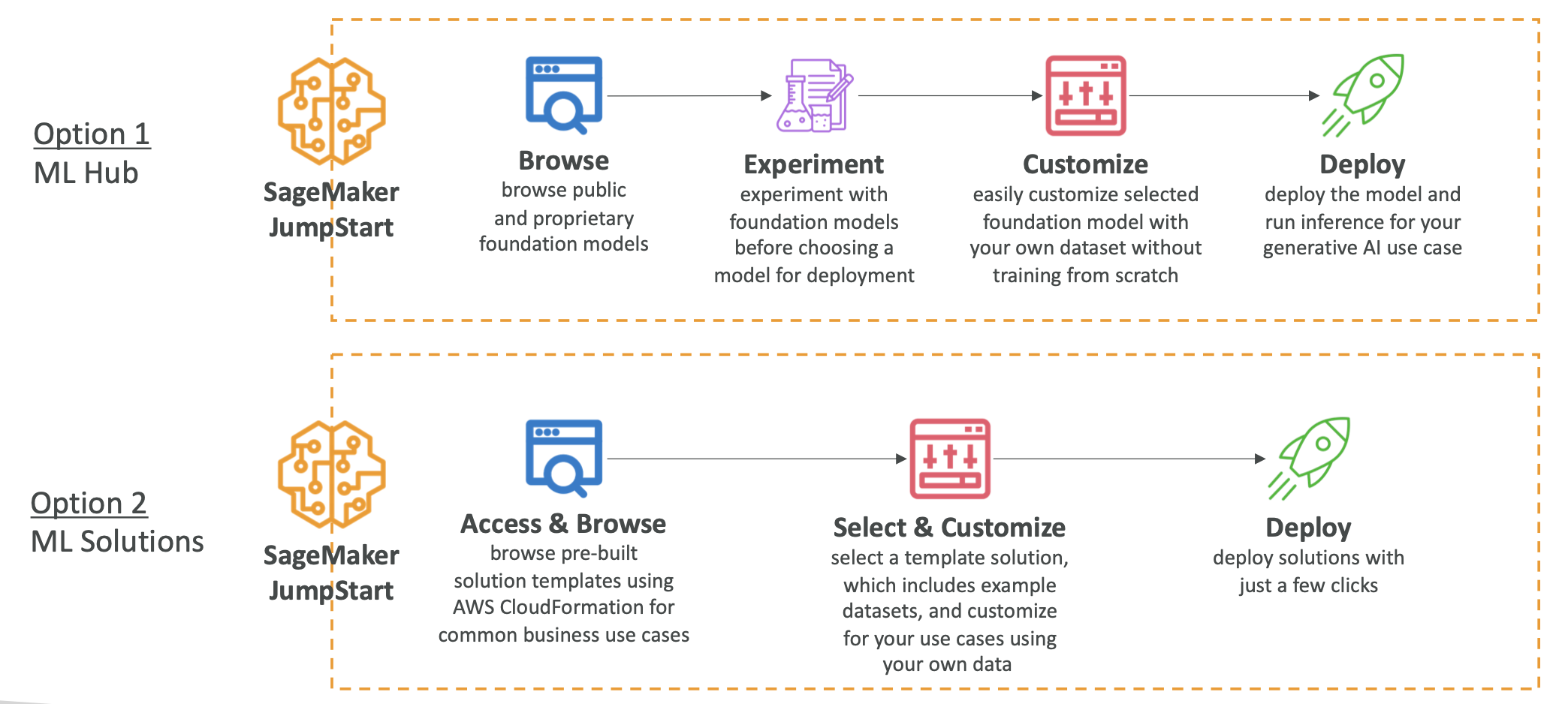
SageMaker JumpStart
- SageMaker JumpStart is an ML hub providing access to pre-trained models
- Pre-trained Foundation Models
- Computer vision models
- Natural language processing models
- Larger collection compared to Amazon Bedrock
- Models from Hugging Face, Databricks, Meta, Stability AI, and more
- Models can be fully customized for your data and use case
- Full control over deployment options
- Pre-built ML solutions for:
- Demand forecasting
- Credit rate predictions
- Fraud detection
- Computer vision
Model Fine-Tuning with JumpStart
- You can fine-tune foundation models from SageMaker JumpStart.
- Fine-tuning is a customization method that involves further training and modifies model weights.
- Fine-Tuning Approaches:
- Domain Adaptation Fine-Tuning:
- Use when prompt engineering doesn’t provide enough customization
- Adapts models to domain-specific language, industry jargon, technical terms, or specialized data
- Instruction-Based Fine-Tuning:
- Uses labeled examples to improve performance on specific tasks
- Labeled examples formatted as prompt-response pairs phrased as instructions
- Domain Adaptation Fine-Tuning:
- Cost Comparison (Least to Most Expensive):
- Prompt Engineering (cheapest)
- Retrieval Augmented Generation (RAG): More expensive than prompt engineering, usually requires a vector database
- Instruction-Based Fine-Tuning: Uses labeled data and modifies model weights, more expensive than RAG or prompt engineering
- Domain Adaptation Fine-Tuning: Uses unlabeled data for fine-tuning, the most expensive approach
SageMaker Canvas
- SageMaker Canvas provides a visual, no-code/low-code interface for building ML models
- Visual interface for ML model development
- Access ready-to-use models from Bedrock or JumpStart
- Build custom models using AutoML powered by SageMaker Autopilot
- Part of SageMaker Studio
- Data transformation leverages Data Wrangler for data preparation
- Ready-to-Use Models:
- Direct integration with AWS AI services:
- Amazon Rekognition
- Amazon Comprehend
- Amazon Textract
- Build complete ML pipelines without writing code
- Leverage various AWS AI services seamlessly
- Direct integration with AWS AI services:
MLFlow for Amazon SageMaker
- MLFlow is an open-source tool that helps ML teams manage the entire ML lifecycle
- Integrates with SageMaker using MLFlow Tracking Servers
- Track runs and experiments
- Launch on SageMaker with a few clicks
Summary
- SageMaker: End-to-end ML service
- SageMaker Automatic Model Tuning: Tune hyperparameters automatically
- SageMaker Deployment & Inference: Real-time, serverless, batch, and async deployment options
- SageMaker Studio: Unified interface for SageMaker
- SageMaker Data Wrangler: Explore and prepare datasets, create features
- SageMaker Feature Store: Store feature metadata in a central place
- SageMaker Clarify: Compare models, explain model outputs, detect bias
- SageMaker Ground Truth: RLHF, human feedback for model grading and data labeling
- SageMaker Model Cards: ML model documentation
- SageMaker Model Dashboard: View all models in one place
- SageMaker Model Monitor: Monitoring and alerts for deployed models
- SageMaker Model Registry: Centralized repository to manage ML model versions
- SageMaker Pipelines: CI/CD for Machine Learning
- SageMaker Role Manager: Access control and permissions
- SageMaker JumpStart: ML model hub & pre-built ML solutions
- SageMaker Canvas: No-code interface for SageMaker
- MLFlow on SageMaker: Use MLFlow tracking servers on AWS