AWS Certified AI Practitioner (AIF-C01)
AWS Certified AI Practitioner (AIF-C01) certification study notes, this guide will help you with quick revision before the exam. it can use as study notes for your preparation.
DashboardAmazon Bedrock
- Amazon Bedrock
- What is Amazon Bedrock?
- Foundation Models
- Fine-Tuning a Model
- Evaluating Foundation Models
- What is RAG (Retrieval-Augmented Generation)?
- What is a Vector Database?
- RAG vs Fine-Tuning Comparison
- When to Use RAG vs Fine-Tuning
- Guardrails
- Bedrock Agents
- Bedrock - Other Features
- Amazon Bedrock \& CloudWatch
- Pricing
What is Amazon Bedrock?
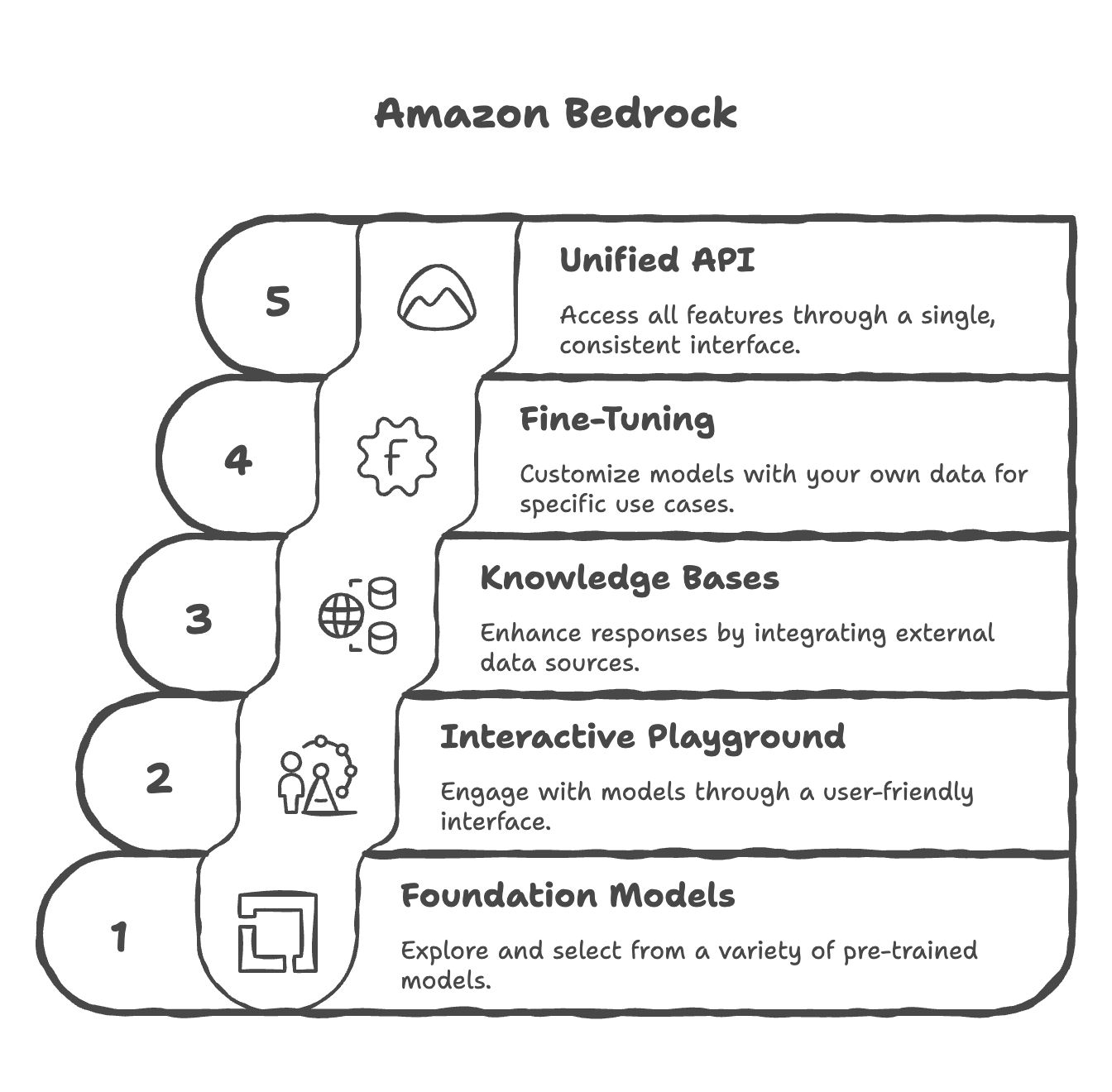
- Primary service on AWS for building generative AI applications
- A fully managed service with no infrastructure or service management required
- Data Control & Privacy: All data remains within your AWS account and never leaves—ensuring complete privacy and security
- Operates on a pay-per-use pricing model (no upfront commitment)
- Provides a unified standardized API for consistent access across all models
- Leverages a wide array of foundation models from multiple providers
- Offers advanced out-of-the-box features:
- Retrieval-Augmented Generation (RAG)
- LLM Agents
- Knowledge Bases
- Built-in capabilities for security, privacy, governance, and responsible AI
- Users focus on applications while AWS manages the infrastructure
Foundation Models
- Amazon Bedrock hosts foundation models from multiple providers with AWS agreements:
- AI21 Labs
- Cohere
- Stability.ai
- Amazon
- Anthropic
- Meta
- Mistral AI
- Reference: https://docs.aws.amazon.com/bedrock/latest/userguide/models-supported.html
- Additional providers and models continue to be added over time
- Model Isolation: When you select a foundation model, Amazon Bedrock creates an exclusive copy accessible only within your account
- Fine-tuning Support: Some models can be fine-tuned with your own data for specific use cases
- Data Privacy Guarantee: None of your data is sent to model providers for training the original foundation models—all operations occur solely within your account
- The model copy can be customized to better suit specific needs without affecting the original foundation model
How to choose a foundation model?
Key Selection Factors
The choice of foundation model depends on multiple factors:
- Model Type & Performance: Different models excel at different tasks
- Capabilities: What the model can and cannot do
- Constraints & Compliance: Business and regulatory requirements
- Customization Options: Ability to fine-tune with your own data
- Model Size & Inference Capabilities: How outputs are generated (affects speed and resource usage)
- Licensing Agreements: Commercial use restrictions or requirements
- Context Window: Maximum amount of data you can send to the model (important for large documents/codebases)
- Latency: Response speed and performance
- Multimodal Support: Can the model handle multiple input types (text, audio, video, images) and produce multiple output types?
Important Considerations
- Trade-offs: Smaller models are more cost-effective but have less knowledge and capability
- Testing is Essential: There is no definitive answer; you must test models with your specific inputs and use cases
- Language Support: Different models support different languages
- Cost Accumulation: AI usage costs can accumulate rapidly, so pricing is a key consideration
Model-Specific Details
Amazon Titan
- High-performing foundation model directly from AWS (important for AWS certification)
- Supports multimodal inputs (text, images)
- Customizable through fine-tuning with your own data
- Cost-effective option
- Best for: Content generation, text classification, educational use cases
Llama-2 (Meta)
- Good for large-scale tasks and dialogue
- More expensive than Amazon Titan but cheaper than Claude
- 4,000 token limit (moderate context window)
- Best for: Technical content generation, customer service applications
Claude (Anthropic)
- Excellent for analysis, forecasting, and detailed document comparison
- Largest context window (200,000 tokens) - can process entire books, large codebases
- Most expensive option
- Best for: Complex analysis tasks, research, large document processing
Stable Diffusion (Stability AI)
- Image generation only
- Charged per image generated
- Best for: Advertising, media creation, visual content generation
Selection Strategy
- Identify Your Requirements: Determine if you need text, images, or multimodal capabilities
- Check Language & Context Needs: Do you need 100+ language support or large context windows?
- Consider Use Cases: Match model strengths to your specific applications
- Factor in Cost: Balance capabilities with pricing for your projected usage
- Test Thoroughly: Validate model performance with your actual inputs and expected outputs before committing to production
Fine-Tuning a Model
- Adapt a copy of a foundation model by adding your own training data
- How It Works: Fine-tuning changes the underlying weights of the base foundation model to better suit your specific needs
- Training Data Requirements:
- Must adhere to a specific format (depends on fine-tuning type)
- Must be stored in Amazon S3
- Output: A fine-tuned version of the foundation model that incorporates your data
Types of Fine-Tuning
1. Instruction-Based Fine-Tuning
-
Improve performance on domain-specific tasks using labeled examples
-
Data Format:
- Requires labeled data as prompt–response pairs
- Each example includes a prompt and expected completion
Example:
Prompt: what is aws?
Completion: AWS stands for Amazon Web Services — it’s Amazon’s cloud computing platform that provides a wide range of on-demand IT services over the internet.
- Benefits:
- Shows the model how you want it to answer specific questions
- Aligns tone and structure of responses
- Teaches domain-specific communication patterns
- Usually cheaper because computations are less intense and less data is required
- Use Case: Teaching a model specific answering style for customer service or specialized tasks
2. Continued Pre-training
- Make a foundation model an expert in a specific domain
- Data Format:
- Requires unlabeled data only (no prompt–response pairs)
- Dataset contains inputs only—the model learns from raw information
- Can be large documents or entire knowledge bases
- Example:
- Feed entire AWS documentation to a model
- After training, the model becomes an AWS expert
- Benefits:
- Model learns specialized knowledge in a specific field
- Can incrementally add more domain-specific data over time
- Adapts to evolving information in your domain
- Use Cases:
- Financial documents with industry-specific terminology
- Medical literature for healthcare applications
- Company proprietary knowledge bases
- Note: Usually more expensive than instruction-based fine-tuning due to higher computational requirements
3. Single-Turn and Multi-Turn Messaging
- Subsets of instruction-based fine-tuning focused on conversational behavior
- Data Format:
- Each message has a role (system, user, or assistant) and content (text)
- Optional system role provides context for the conversation
Example Structure:
System: You are a helpful customer service assistant.
User: What are your support hours?
Assistant: We're available 24/7 to assist you.
User: How do I reset my password?
Assistant: You can reset your password by clicking "Forgot Password" on the login page.
Transfer Learning
- Using a pre-trained model to adapt it to a new but related task
- Key Concept:
- Foundation models already have base knowledge (recognize patterns, process language, etc.)
- Transfer learning leverages this knowledge for specialized applications
- Fine-tuning is a specific type of transfer learning
- Examples:
- Image Classification: Pre-trained model knows edges/shapes → fine-tune to recognize specific image classes
- NLP Tasks: Model understands language → transfer to domain-specific tasks
Use Cases for Fine-Tuning
Common scenarios where fine-tuning is beneficial:
- Chatbot Personalization
- Create a chatbot with a particular persona, tone, or brand voice
- Example: Customer service bot with friendly, empathetic tone
- Purpose-Specific Adaptation
- Adapt a model for specific business purposes
- Examples: Customer assistance, advertisement creation, technical support
- Proprietary Data Integration
- Train with exclusive data the foundation model doesn’t have access to
- Examples: Historical emails, internal messages, customer service records, company procedures
- Targeted Tasks
- Specialized applications like text categorization or accuracy assessment
- Domain-specific classification tasks
Evaluating Foundation Models
- Sometimes you need to evaluate a model rigorously before selection or deployment
- Amazon Bedrock provides Automatic Evaluation feature to assess models for quality control
- Evaluation helps measure accuracy, speed, efficiency, and scalability of models
- Can detect bias and potential discrimination against groups of people
- Ensures model quality, fairness, and effectiveness in real-world applications
- We can have business metrics top evaluate a model on:
- Uses Satisfaction: gather use feedback and asses their satisfaction with the model responses
- Average Revenue Per Use (ARPU): we can compute the average revenue per user attributed to the GenAI app (monitor ecommerce user base revenue)
- Cross-Domain Performance: measure the model’s ability to perform cross different domain tasks (example monitor multi-domain ecommerce platforms)
- Conversion Rate: generate recommended desired outcomes such as purchases
- Efficiency: evaluate the model’s efficiency in computation, resource utilization
Automatic Evaluation
- Uses benchmark questions and benchmark answers representing ideal responses
- The model to be evaluated generates answers to benchmark questions
- A judge model (another generative AI model) compares generated answers with benchmark answers
- The judge model assigns a grading score based on similarity and quality
- Built-in task types:
- Text summarization
- Question and answer
- Text classification
- Open-ended text generation
- Prompt Datasets
- Your own custom prompt datasets (tailored to your specific needs)
- AWS built-in curated prompt datasets (pre-validated collections)
- Scores are calculated automatically
- There are different ways to calculate this grading score suing various statistical methods (example BERTScore, F1 score)
Human Evaluation
- Benchmark questions and answers are reviewed by humans (not automated)
- Evaluators compare benchmark answers to model-generated answers
- Humans judge correctness based on domain expertise and business criteria
- This work team can be employees of our company or subject-matter experts (SMEs)
- We define metrics and how to evaluate a model: thumbs up/down, ranking, etc.
- We can chose from built-in task types (same as with automatic evaluation) or add custom task types
What is RAG (Retrieval-Augmented Generation)?
- Definition: Allows a foundation model to reference data sources outside of its training data without requiring fine-tuning
- Key Advantage: Enables models to access up-to-date and specific information dynamically
- Use Case: Perfect for company-specific data or frequently updated information
- Comparison to Fine-Tuning: RAG doesn’t require retraining; it retrieves data at query time
- This data source is usually stored in a vector database
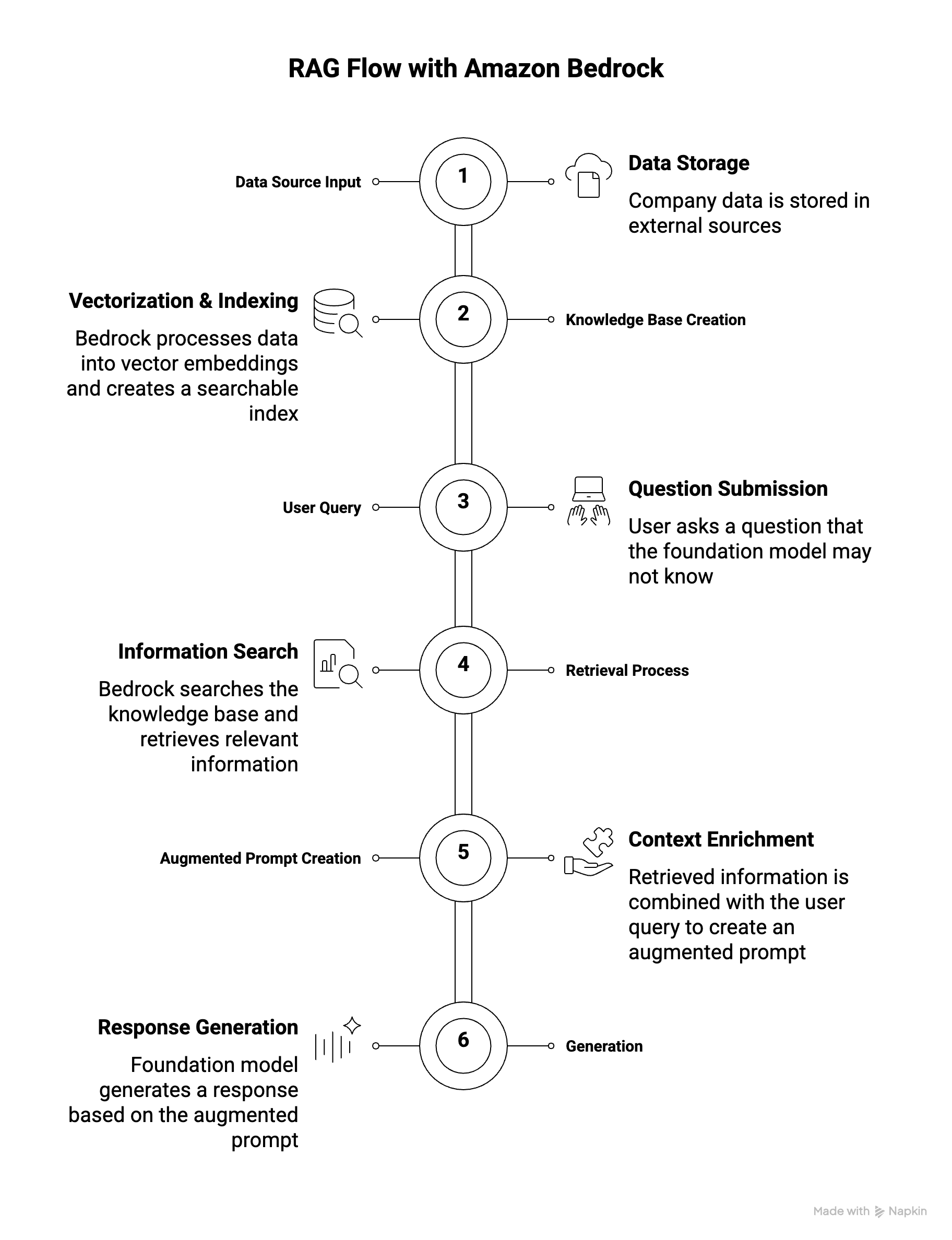
How RAG Works with Amazon Bedrock
- Data Source Input
- Your data is stored in external sources (e.g., Amazon S3, Confluence, SharePoint)
- Example: Company documents, product information, customer records
- Knowledge Base Creation
- Amazon Bedrock automatically processes your data from the source
- Data is converted into vector embeddings via a vector database
- Creates a searchable index of your data
- User Query
- User asks: “Who is the product manager for John?”
- Foundation model may not have this company-specific information in its training data
- Retrieval Process
- A search is performed within the knowledge base
- Relevant information is fetched from the vector database using similarity matching
- Example results: John’s details, support contacts, product manager: Bob, engineer: Sara
- Augmented Prompt Creation
- Retrieved information is combined with the original user query
- Augmented prompt now contains both the question and relevant context
- This enriched prompt is sent to the foundation model
- Generation
- Foundation model generates a response based on the augmented prompt
- Response: “Jessie Smith is the product manager for John.”
Benefits of RAG
- Real-Time and Up-to-Date Data: Feed current information without retraining
- Cost-Effective: No fine-tuning required; use base models
- Company-Specific Information: Retrieve proprietary data not in foundation model training
- Dynamic Content: Access latest documents, PDFs, and information automatically
- Scalability: Add new data sources without model retraining
What is a Vector Database?
- Store vector embeddings of your documents for efficient retrieval
- Enable similarity search to find relevant information based on meaning, not exact keywords
- Created automatically by Bedrock from your data sources
- Support nearest neighbor (KNN) search for fast information retrieval
Available Vector Database Options
- AWS-Native Options
| Service | Description | Best For |
|---|---|---|
| Amazon OpenSearch Service | Serverless/managed clusters, real-time search & analytics | Production RAG, millions of embeddings, scalable KNN search |
| Amazon Aurora | Relational database with vector support | Relational data structures, existing Aurora environments |
| Amazon Neptune Analytics | Graph database service | Graph-based RAG (GraphRAG), relationships between entities |
| Amazon S3 Vectors | Cost-effective vector storage in S3 | Cost-optimized scenarios, sub-second query performance |
-
External Options
- MongoDB: Document database with vector search capabilities
- Redis: In-memory database for fast vector operations
- Pinecone: Specialized vector database service (third-party)
Data Sources Supported by Amazon Bedrock
Amazon Bedrock can ingest data from multiple sources:
- Amazon S3: Cloud file storage (documents, PDFs, etc.)
- Confluence: Wiki and collaboration platform
- Microsoft SharePoint: Enterprise content management
- Salesforce: CRM data and customer information
- Webpages: Websites, social media feeds, public content
- Future: More data sources expected to be added over time
Vector Embeddings and Document Processing
- Embedding Models: Convert data (text, images) into numerical vectors
- Available embedding models: Amazon Titan, Cohere
- Embedding model can be different from the foundation model
- Document Chunking: Documents are split into chunks before vectorization
- Improves retrieval relevance and efficiency
- Smaller chunks = more precise matches
- Searchability: Vectors are easily searchable using similarity queries
- Semantic Search: Find relevant information based on meaning, not just keywords
Use Cases for Amazon Bedrock with RAG
- Customer Service Chatbot
- Knowledge Base Contains:
- Product information and specifications
- Features and capabilities
- Troubleshooting guides
- Frequently asked questions (FAQs)
- How It Works:
- Customer asks: “How do I troubleshoot error code 404?”
- System retrieves relevant troubleshooting guide from knowledge base
- Chatbot provides accurate, specific answer
- Benefits: Real-time product information, consistent responses, reduced support load
- Knowledge Base Contains:
- Legal Research and Analysis
- Knowledge Base Contains:
- Laws and regulations
- Case precedents
- Legal opinions
- Expert analysis
- How It Works:
- Lawyer queries: “What are the precedents for contract violations in tech?”
- System retrieves relevant case law and legal opinions
- Provides comprehensive analysis with citations
- Benefits: Fast legal research, consistent interpretation, up-to-date statutes
- Knowledge Base Contains:
- Healthcare Question Answering
- Knowledge Base Contains:
- Disease information and treatment options
- Clinical guidelines
- Research papers
- Previous patient data (anonymized)
- How It Works:
- Medical professional asks: “What are the latest treatment options for diabetes?”
- System retrieves latest clinical guidelines and research
- Provides evidence-based answers
- Benefits: Access to latest medical research, evidence-based recommendations, quick decision support
- Knowledge Base Contains:
RAG vs Fine-Tuning Comparison
| Aspect | RAG | Fine-Tuning |
|---|---|---|
| Data Update Frequency | Real-time | Requires retraining |
| Implementation Speed | Immediate | Time-consuming |
| Cost | Lower (no retraining) | Higher (computation) |
| Data Size | Can handle large datasets | Limited by training data |
| Model Changes | No model modification | Model weights updated |
| Best For | Dynamic, frequently-updated data | Static, domain-specific knowledge |
When to Use RAG vs Fine-Tuning
- RAG:
- Company-specific, proprietary data
- Frequently updated information
- Large document collections
- Multiple data sources
- Need for latest information
- Fine-Tuning:
- Improve model tone/style
- Build domain expertise
- Permanent knowledge integration
- Limited external data sources
Guardrails
- Control interaction between users and foundation models
- Primary Functions:
- Filter undesirable and harmful content
- Remove Personally Identifiable Information (PII) - Names, emails, phone numbers, SSN, credit cards, etc.
- Reduce hallucinations by enforcing fact-based responses
- Maintain response quality and compliance
- Architecture: Multiple guardrails at multiple levels
- Input layer: Filter user requests before processing
- Processing layer: Control model behavior
- Output layer: Sanitize responses before returning to users
- Monitoring: Track and analyze guardrail violations to refine rules and ensure proper calibration
- Key Benefits: Safety, privacy, reliability, compliance, transparency
Bedrock Agents
- We can create agents that will fulfill users’ requests, invoke specific APIs automatically based on the needs
- Intelligent entities that think and act autonomously to perform multi-step tasks
- Not just answering questions - they execute complex workflows
- Can create infrastructure, deploy applications, perform operations
- Think and act autonomously without explicit programming for each task
- Define what actions agents can perform
- Integrate with APIs, Lambda functions, databases, and external systems
- Can exchange data or initiate actions automatically
- Define expected inputs
- Agent Responsibilities:
- Example: Access customer purchase history → Provide recommendations → Place new orders
- Agent understands these responsibilities and acts accordingly
- How Agents Work (Chain of Thought Approach):
- Agent receives task and examines: prompt, conversation history, available actions, knowledge bases
- Sends request to Bedrock Foundation Model to generate action plan
- Model outputs step-by-step instructions
- Agent executes steps sequentially (calling APIs, searching knowledge bases)
- Results returned to Bedrock model for synthesis
- Final response generated and returned to user
Bedrock - Other Features
- Bedrock Studio:
- It is an UI that we can provide to our team so they can create AI powered applications easily
- Watermark detection:
- Check if an image was generated by Amazon Titan Generator
Amazon Bedrock & CloudWatch
- Amazon Bedrock integrates with CloudWatch for comprehensive cloud monitoring
- Model Invocation Logging:
- Captures all model invocations (inputs and outputs)
- Data types: text, images, embeddings
- Storage destinations: CloudWatch Logs or Amazon S3
- Provides complete history of all Bedrock activities
- CloudWatch Logs Insights:
- Real-time analysis of logs stored in CloudWatch Logs
- Full tracing and monitoring capabilities
- Build alerting mechanisms based on logs
- CloudWatch Metrics:
- Bedrock publishes various metrics to CloudWatch Metrics
- General usage metrics: Track overall Bedrock usage
- Feature-specific metrics:
- Example: “Content Filtered Count” - tracks guardrail filtering
- Shows if content was blocked due to guardrail policies
- CloudWatch Alarms:
- Create alarms to get notified when events occur
- Example: Alert when content is caught by guardrails
- Monitor specific thresholds for any metric
- Enables proactive monitoring and operational excellence
- Use Cases: Operational monitoring, compliance tracking, guardrail effectiveness analysis, security monitoring
Pricing
Pricing Modes
- On-Demand Mode:
- Pay-as-you-go (no long-term commitment)
- Text models: charged for every input/output token processed
- Embedding models: charged for every input token processed
- Image models: charged for every image generated
- Works with Base models only
- Ideal for unpredictable workloads
- Batch Mode:
- Process multiple predictions at once
- Output delivered as single file in Amazon S3
- Responses are delayed (not real-time)
- Offers up to 50% discount
- Cost-effective for non-urgent workloads
- Provisioned Throughput:
- Purchase model units for fixed period (1 month, 6 months, etc.)
- Guarantees max input/output tokens per minute
- Ensures consistent capacity and performance
- Works with Base, Fine-tuned, Custom, and Imported models
- Required for fine-tuned and custom models (cannot use On-Demand)
Cost Impact of Model Improvement Approaches
| Approach | Cost | Details |
|---|---|---|
| Prompt Engineering | Very Low | No fine-tuning needed, optimize prompts only |
| RAG | Moderate | Costs for vector database and access system |
| Instruction-Based Fine-Tuning | Medium | Less intensive computation, labeled data |
| Full Fine-Tuning | High | Most expensive, domain-specific training, unlabeled data |
Cost Optimization Strategies
- Token Management (Primary cost):
- Efficient prompt design
- Concise outputs
- Minimize input/output tokens
- Model Size: Smaller models generally cost less (varies by provider)
- Parameter Tuning: Does NOT affect pricing
- Temperature, Top K, Top P don’t impact cost
- Only affects model behavior
- Batch Mode: Use for non-urgent workloads (up to 50% savings)
- On-Demand: For unpredictable/variable workloads
- Provisioned Throughput: For predictable, sustained usage